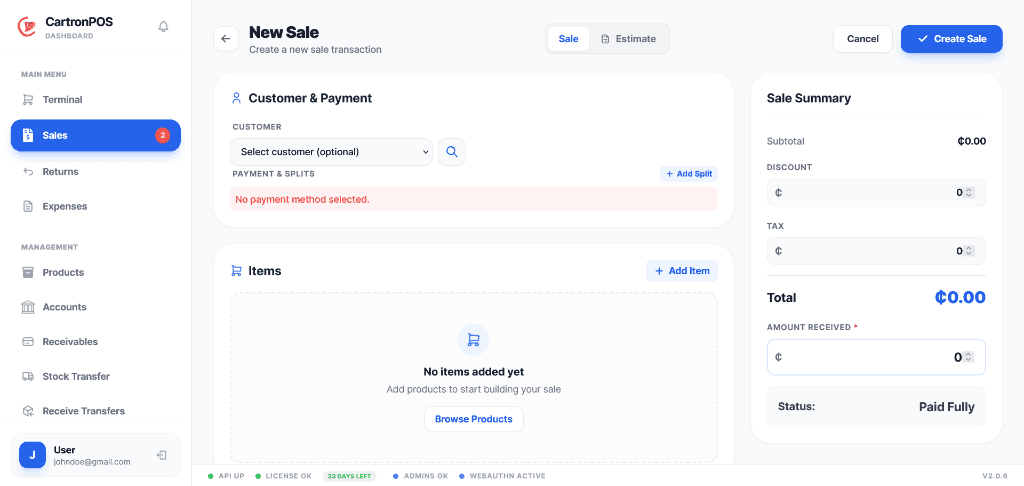
Each team works in the screens relevant to its responsibilities, while approved stock, sales, and finance records remain connected where the workflow requires them.
Core platform
Point of Sale
Fast branch checkout with accountable payments, cash control, returns, promotions, and customer loyalty.
Run the terminal in the hosted application or keep selling through the local desktop app when connectivity is unreliable. Every sale remains tied to its branch, cashier, payment account, stock movement, and audit history.
Barcode, SKU, variant, serial, and GS1-assisted product entry
Held carts, customers, promotions, loyalty, credit, and split payments
Cash drawer sessions, automatic pre-sale checks, movements, and reconciliation
Receipts, sales history, controlled manual sales, and auditable returns
Offline-capable local selling with branch-scoped hosted synchronization
Typical workflow
1Open or confirm the cashier drawer session
2Build the cart and apply the approved customer, price, promotion, or loyalty rules
3Collect one or more payments and issue the receipt
4Post stock, account, customer, and audit activity to the originating branch
Access and data scope
Sales and drawer sessions belong to the selling branch. Store assignments, POS menu access, and action permissions determine who may sell, discount, return, reconcile, or review transactions.
Connected to Inventory, Accounting
Designed for: Retail counters, school shops, pharmacies, hospital billing points, restaurants, and service desks.
Separate warehouse and selling stock while retaining one traceable product and movement history.
Model products once, then hold quantities by branch, warehouse, division, variant, batch, or serial number. Procurement, receiving, transfers, valuation, and replenishment all use the same branch-scoped stock records.
Products, categories, brands, units, variants, serial or IMEI tracking, and recipes
Multiple inventory divisions for warehouses, departments, food courts, or product groups
Purchase orders, supplier receiving, stock transfers, and destination acceptance
Movement ledger, valuation, cycle-count priorities, and controlled reconciliation
Low-stock analysis, replenishment forecasts, supplier ranking, and reviewed assistant drafts
Typical workflow
1Create the shared product record and assign it to the required inventory divisions
2Receive opening stock or supplier deliveries into the correct warehouse or branch
3Transfer, issue, sell, return, or adjust quantities through recorded stock movements
4Review valuation, ledger differences, reorder needs, and replenishment decisions
Access and data scope
Product identity is tenant-wide while quantities remain scoped to the store, inventory division, variant, batch, or serial record that owns them. Warehouse stock is not automatically treated as terminal stock.
A foundation workspace used by other modules
Designed for: Single shops, multi-branch companies, warehouses, central stores, production locations, and department stockrooms.
Branch-aware payment accounts and operating ledgers connected directly to sales and purchasing activity.
Keep financial activity connected to the transaction that created it. Sales, refunds, receivables, payables, and expenses feed account histories and reporting without losing branch or payment-account context.
Payment accounts with branch balances, defaults, and persistent transaction histories
Customer receivables, supplier payables, due dates, statuses, and settlements
Categorized expenses with references, approval state, and payment-account posting
Sales, return, and billing entries linked to their originating operational records
Revenue, margin, cost, promotion, payment-method, and branch reporting
3Record receivables, payables, expenses, transfers, and settlements
4Reconcile account histories and report by branch, period, account, or transaction source
Access and data scope
Accounts are available only to their permitted tenant and branch context. Financial permissions separately control viewing, creating, approving, settling, transferring, and reporting.
A foundation workspace used by other modules
Designed for: Owners, finance teams, branch managers, cashiers, purchasing teams, and billing offices.
Coordinate tables, waiter orders, kitchen preparation, recipes, and counter payments in one flow.
Separate food-court, bar, wine-court, kitchen, and warehouse stock while sharing authorized users and management reporting. Confirmed orders move from service staff to kitchen tickets and then into POS settlement.
Dining areas, tables, seats, guests, occupancy, and active-sale state
Waiter-focused ordering with controlled confirmation into kitchen operations
Kitchen tickets with accepted, preparing, ready, served, priority, and cancellation states
Recipes, ingredient consumption, yields, and product composition costing
Separate inventory divisions and branch stock for food, beverages, and central kitchens
Typical workflow
1Seat guests or start a waiter order for the correct dining area
2Confirm items and route preparation work to the kitchen display
3Move tickets through preparation, ready, and served states
4Settle through POS while recipes and branch inventory record ingredient consumption
Access and data scope
Restaurant access can be separated for waiters, kitchen staff, cashiers, stock teams, and managers. Food, bar, wine-court, and central-store quantities can remain in distinct divisions.
Connected to Point of Sale, Inventory
Designed for: Restaurants, food courts, bars, wine courts, cafeterias, bakeries, and central kitchens.
Control medicine identity, prescriptions, batches, dispensing, expiry, recalls, and pharmacy stock.
Combine medicine-specific controls with the shared POS and inventory engine. Community and hospital pharmacies can receive batches, prioritize FEFO stock, dispense prescriptions, and preserve branch-level medicine history.
Medicine profiles, dosage details, prescription requirements, and product linkage
Batch receiving with quantities, cost, expiry, and FEFO availability
Quarantine, recall, expired-stock, and dispensing controls
Prescription review, dispensing records, and terminal stock deduction
Hospital prescription and billing integration with pharmacy inventory
Typical workflow
1Link products to medicine profiles and receive traceable batches
2Review prescription requirements, available batches, expiry, quarantine, and recall state
3Select eligible stock using FEFO controls and record the dispensing event
4Post the charge, stock deduction, batch history, and prescription outcome together
Access and data scope
Medicine stock is store and batch scoped. Pharmacy permissions distinguish medicine setup, receiving, prescription review, dispensing, inventory control, and management reporting.
Connected to Inventory, Point of Sale
Designed for: Community pharmacies, hospital pharmacies, clinics, medicine stores, and dispensaries.
A separate clinical workspace spanning front desk, care delivery, diagnostics, pharmacy, stores, and billing.
Give each department a focused menu while maintaining one branch-scoped patient and encounter record. Role permissions control access to clinical work, results, records, stock, claims, and financial operations.
Patient registration, appointments, encounters, practitioner worklists, and clinical records
Emergency triage, inpatient wards, admissions, theatre, maternity, and pediatrics
Laboratory and radiology orders, result entry, reporting, review, and acknowledgement
Service billing, insurance coverage, claims, payments, and account-ledger posting
Hospital pharmacy dispensing linked to prescriptions, batches, stock, and billing
Central stores, departmental requisitions, approval, issue, receipt, and stock traceability
Typical workflow
1Register the patient and schedule or begin the relevant encounter
2Record clinical work and place diagnostic, pharmacy, admission, theatre, or departmental orders
3Complete results, treatment, dispensing, requisitions, and departmental hand-offs
4Post services to billing, process coverage or claims, collect payment, and complete the episode of care
Access and data scope
Patient identity remains connected across authorized care workflows while encounters, orders, stock, billing, and worklists retain branch and department context. Clinical menu and action permissions limit access by role.
Connected to Pharmacy, Inventory, Accounting
Designed for: Hospitals, clinics, diagnostic centres, laboratories, imaging centres, and specialist facilities.
A dedicated education workspace connected to school fees, campus commerce, inventory, and accounting.
Manage the student journey from application through enrollment, teaching, assessment, reporting, progression, and transfer. Guardians receive controlled portal access while school shops and cafeterias use the shared POS.
Admissions applications, student records, guardians, enrollment, lifecycle, and transfers
Academic years, terms, classes, subjects, teaching assignments, and timetables
Attendance registers, assessments, score entry, grading, and report cards
Progression decisions, academic rollover, promotion, repetition, and completion history
Fee structures, student charges, balances, payments, and accounting integration
Secure guardian portal links plus school shop, bookshop, and cafeteria operations
Typical workflow
1Capture the application, admission decision, student record, guardians, and enrollment
2Assign classes, subjects, teachers, and timetable periods for the active academic term
3Record attendance, assessments, scores, grading, report cards, and guardian communication
4Manage fees, progression, rollover, transfers, completion, and connected campus commerce
Access and data scope
Student, guardian, academic, and fee records are tenant controlled and retain campus or branch context where applicable. Staff only see school menus and actions granted to their roles and assignments.
Connected to Point of Sale, Inventory, Accounting
Designed for: Schools, colleges, campuses, school shops, bookshops, cafeterias, and education groups.
Branch-scoped member savings, lending, teller, collections, compliance, and portfolio control built on an immutable financial trail.
Operate a savings-and-loans or microfinance institution through a separate workspace. Shared customer identity is extended with dedicated KYC, member, deposit-account, credit, collateral, approval, and compliance records while every posted amount is designed to reconcile to Accounting.
Member onboarding, KYC evidence, risk rating, periodic review, PEP and sanctions controls
Versioned savings and loan products with integer minor-unit values and basis-point rates
1Register or link the customer and approve a dedicated financial-member and KYC profile
2Open an approved savings account or submit a loan application under a versioned product
3Complete teller or credit work through branch permission, limit, and maker-checker controls
4Post immutable financial events, reconcile daily controls, and review portfolio and compliance exceptions
Access and data scope
Products and institution configuration are tenant-wide. Members, accounts, applications, loans, teller activity, compliance cases, and financial events retain explicit home or transaction branch scope and permission boundaries.
Connected to Accounting
Designed for: Savings and loans companies, microfinance banks, microcredit institutions, community finance operations, credit unions, and field-lending organizations subject to their applicable licence.
Administrators can assign modules, locations, roles, and individual actions independently. A cashier, teacher, pharmacist, accountant, or manager can therefore work from a focused view without receiving unrestricted access.
Modules define workspaces
POS, inventory, accounting, restaurant, pharmacy, hospital, and school each have a separate workspace. A disabled module is removed from the module dashboard and its routes remain protected.
Assignments define location
Tenant ownership is always enforced. Store, branch, campus, facility, warehouse, inventory division, and department assignments narrow the records a person can operate on.
Roles define responsibility
One person can work across approved modules or branches. Roles can separate cashier, stock, finance, kitchen, clinical, teaching, admissions, laboratory, and administrative duties.
Permissions define actions
Menu visibility follows read permissions, while create, edit, approve, transfer, dispense, settle, export, configure, and delete operations require their own authorization.
What keeps locations and teams connected
The shared capabilities behind local branch continuity, hosted administration, controlled access, and operational visibility.
Offline-Capable Desktop POS
The local application keeps checkout and local operations available without a continuous internet connection.
Secure Business Accounts
Each company has a separate account and can sign in through its managed subdomain or configured custom domain.
Two-way Data Sync
Local and hosted databases exchange branch-scoped operational records in resumable chunks with retries and clear failure visibility.
Branch License Activation
Generate downloadable store license files for activating and identifying local branch installations.
Business-Specific Onboarding
Business and branch types provide compatible defaults while onboarding records the modules, organization details, first branch, and operating preferences.
Division and Warehouse Stock
Products can be assigned to distinct inventory divisions while quantities remain owned by the correct branch, warehouse, variant, batch, or serial record.
Module and Menu Permissions
Module access, workspace menus, individual actions, branches, and departments can be assigned independently to each role or user.
MFA and Account Recovery
Protect hosted accounts with multi-factor authentication, authenticator or email challenges, recovery codes, password reset, and security settings controlled by the signed-in user.
Subscription Lifecycle
A 14-day hosted trial, visible subscription status, plan capacity, renewal processing, expiry handling, and store-specific local licences keep commercial access explicit.
Shared Administration
Organization settings, users, roles, stores, templates, audit history, diagnostics, and synchronization controls remain in one administration area.
Notifications and Reminders
Operational notifications, synchronization failures, subscription reminders, and transactional email delivery give users and administrators timely follow-up information.
Governed Data Integration
Validated workbook imports, scoped API credentials, idempotent writes, signed webhooks, retries, dead-letter history, and audit records support controlled connections to external systems.
Public Shop Profiles
Publish eligible businesses in the shop directory with company details, branding, contact information, and active branches.
Profile and Sales Export
Users can maintain their profile and export company-branded sales data to a formatted Excel workbook.
How supported branch records synchronize
Changes are captured, exchanged, applied safely, and made visible for review while retaining their branch and organization context.
01
Capture
Supported local and hosted changes create durable synchronization events after the operational transaction succeeds.
02
Exchange
Authenticated branches push and pull records in bounded chunks using stable identities, branch context, and a persisted cursor.
03
Apply safely
Idempotency checks prevent duplicate application. Partial failures remain visible and retryable instead of discarding the entire batch.
04
Reconcile
Hosted dashboards consolidate accepted branch data while stock, sales, accounts, and audit history retain their originating branch.
Review the available operational tools
Use this section when evaluating specific requirements. Actual visibility still depends on the modules, locations, menus, and actions assigned to the signed-in user.
01 / Sales
Sales
Checkout, transaction control, discounts, returns, cash accountability, and performance reporting.
7 modules
Dashboard
Track current sales, revenue, profit, stock alerts, customers, and recent business activity.
Reports & Insights
Analyze revenue, margins, products, payment methods, expenses, and branch performance by period.
New Sale
Sell by product, SKU, barcode, or variant with customers, promotions, held carts, split payments, and printable receipts.
Sales
Review completed sales, inspect transaction details, and record controlled manual sales when required.
Cash Drawer
Open and close drawer sessions, record cash movements, and reconcile expected and counted balances.
Promotions
Create and manage automatic or code-based discounts that are applied directly in the terminal.
Returns
Process returns against recorded sales while preserving refund, inventory, and audit details.
02 / Restaurant
Restaurant
Front-of-house ordering, live table state, and a dedicated kitchen ticket workflow.
3 modules
Waiter Ordering
Create restaurant orders through a waiter-focused workflow and send confirmed items into kitchen operations.
Open the dedicated workspace for admissions, students, guardians, academics, attendance, assessments, reports, progression, transfers, fees, and campus commerce.
06 / Hospital
Hospital
Patient and encounter workflows across front desk, emergency, inpatient care, theatre, maternity, pediatrics, diagnostics, records, billing, pharmacy, and central stores.
1 modules
Hospital Management
Open the dedicated workspace for patients, encounters, emergency, inpatient, theatre, maternity, pediatrics, diagnostics, records, billing, pharmacy, and central stores.
Open the dedicated workspace for financial members, KYC, savings, teller operations, lending, collections, compliance, and portfolio control.
08 / People
People
Customer records, relationships, and staff attendance workflows.
3 modules
Customers
Maintain tenant customer records and use them throughout sales, returns, receivables, and service workflows.
Loyalty
Configure earning tiers, review branch customer balances and history, and post controlled point adjustments.
Time Clock
Clock team members in and out, review attendance sessions, and calculate worked duration.
09 / Administration
Administration
Users, roles, branches, organization settings, templates, accountability, and system health.
8 modules
Team & Permissions
Manage users, roles, permissions, store assignments, account status, and password resets.
Locations
Manage branches, currencies, active status, branch identifiers, user access, and downloadable license files.
General Settings
Configure company details, branding, currency, tax, public visibility, stores, and business-specific menus.
Document Templates
Manage reusable document templates and choose the defaults used by supported business documents.
Activity History
Review tenant activity records by action, entity, user, source, date, and recorded change details.
System Health
Inspect application, database, tenant, store, user, inventory, sales, and configuration health signals.
Integrations
Create branch- and scope-limited API credentials with rate limits, idempotent writes, and audit history; import validated product, opening-stock, or customer workbooks with preview and guarded rollback; and configure signed webhooks with retries, dead-letter history, and controlled replay.