

Keep branches working
Continue supported sales and branch workflows locally during an internet interruption, then synchronize when connectivity returns.
Keep branch teams working locally when the internet is unreliable, while owners and managers retain the cloud visibility they need.
Fast checkoutLocal performance
Scoped accessRole + location
Hosted oversightCross-branch control
Give each team the tools it needs without forcing retailers, restaurants, pharmacies, hospitals, schools, and financial institutions into the same screens.
Continue supported sales and branch workflows locally during an internet interruption, then synchronize when connectivity returns.
Separate quantities by branch, store, warehouse, campus, facility, or inventory division while retaining centralized oversight.
Control access by module, branch, department, menu, and action so staff see the tools and records required for their role.
Point of Sale, Inventory, and Accounting provide the core. Add Restaurant, Pharmacy, Hospital, School, or Savings & Loans tools when they fit your organization.
Fast branch checkout with accountable payments, cash control, returns, promotions, and customer loyalty.
Run the terminal in the hosted application or keep selling through the local desktop app when connectivity is unreliable. Every sale remains tied to its branch, cashier, payment account, stock movement, and audit history.
Connected to Inventory, Accounting
Separate warehouse and selling stock while retaining one traceable product and movement history.
Model products once, then hold quantities by branch, warehouse, division, variant, batch, or serial number. Procurement, receiving, transfers, valuation, and replenishment all use the same branch-scoped stock records.
A foundation workspace used by other modules
Branch-aware payment accounts and operating ledgers connected directly to sales and purchasing activity.
Keep financial activity connected to the transaction that created it. Sales, refunds, receivables, payables, and expenses feed account histories and reporting without losing branch or payment-account context.
A foundation workspace used by other modules
Coordinate tables, waiter orders, kitchen preparation, recipes, and counter payments in one flow.
Separate food-court, bar, wine-court, kitchen, and warehouse stock while sharing authorized users and management reporting. Confirmed orders move from service staff to kitchen tickets and then into POS settlement.
Connected to Point of Sale, Inventory
Control medicine identity, prescriptions, batches, dispensing, expiry, recalls, and pharmacy stock.
Combine medicine-specific controls with the shared POS and inventory engine. Community and hospital pharmacies can receive batches, prioritize FEFO stock, dispense prescriptions, and preserve branch-level medicine history.
Connected to Inventory, Point of Sale
A separate clinical workspace spanning front desk, care delivery, diagnostics, pharmacy, stores, and billing.
Give each department a focused menu while maintaining one branch-scoped patient and encounter record. Role permissions control access to clinical work, results, records, stock, claims, and financial operations.
Connected to Pharmacy, Inventory, Accounting
A dedicated education workspace connected to school fees, campus commerce, inventory, and accounting.
Manage the student journey from application through enrollment, teaching, assessment, reporting, progression, and transfer. Guardians receive controlled portal access while school shops and cafeterias use the shared POS.
Connected to Point of Sale, Inventory, Accounting
Branch-scoped member savings, lending, teller, collections, compliance, and portfolio control built on an immutable financial trail.
Operate a savings-and-loans or microfinance institution through a separate workspace. Shared customer identity is extended with dedicated KYC, member, deposit-account, credit, collateral, approval, and compliance records while every posted amount is designed to reconcile to Accounting.
Connected to Accounting
Local work with cloud visibility
The desktop application supports day-to-day work at each branch. The hosted application gives authorized teams access to setup, users, reporting, subscriptions, and cross-branch management.
Fast checkout, hardware support, local stock workflows, and offline-capable operations.
Company setup, reporting, branch visibility, specialist workspaces, and synchronization monitoring.
Step 1
Start with Point of Sale, Inventory, and Accounting, then add specialist workspaces when your organization needs them.
Step 2
Create branches, stores, warehouses, campuses, facilities, and stock divisions around the way your organization operates.
Step 3
Give users the locations, modules, menus, and actions required for their responsibilities.
Step 4
Run daily work locally or online and review permitted information from the hosted workspace.
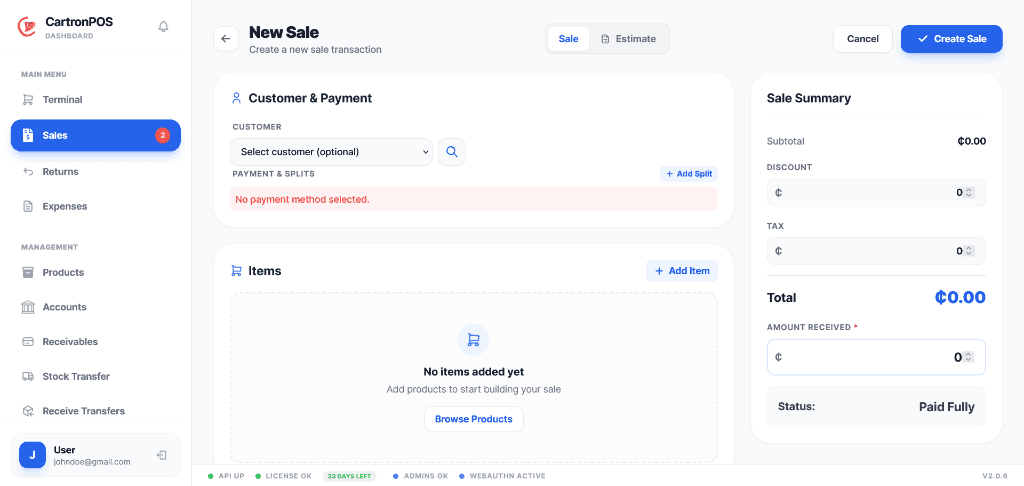
Review the interfaces your teams use for checkout, product management, and movement of stock between locations.
Process checkout, customers, promotions, held carts, split payments, and receipts.
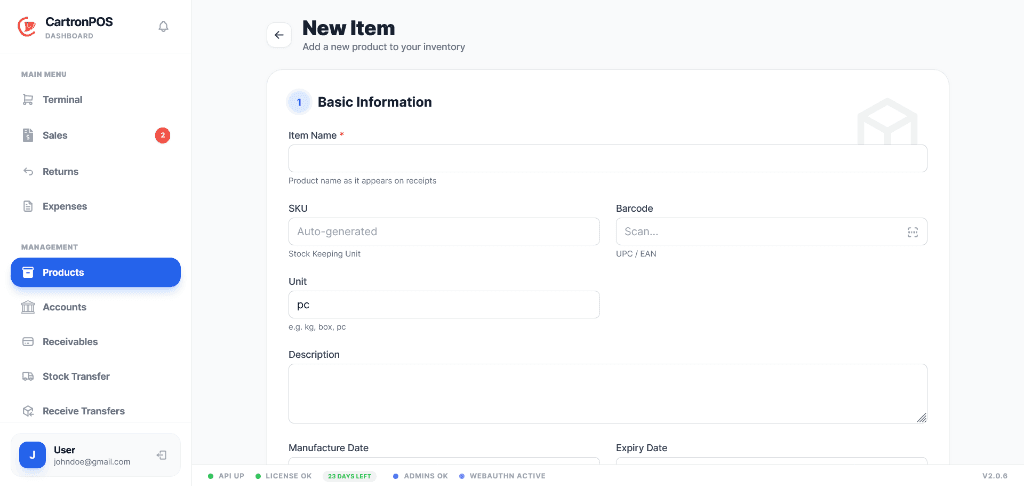
Manage products, variants, pricing, stock rules, images, units, and lifecycle details.
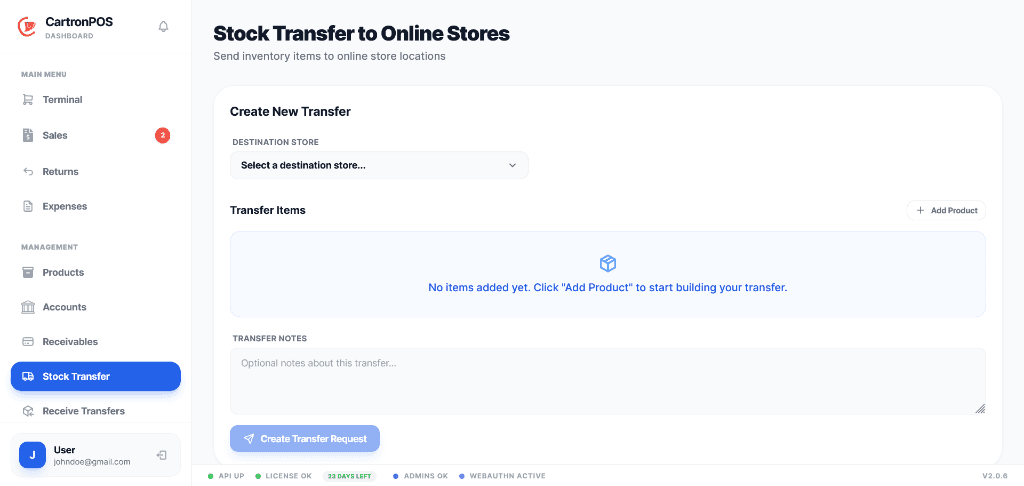
Move and receive inventory between authorized stores with a traceable transfer status.
Smaller teams can create an account without a credit card. Hospitals, schools, and multi-location organizations can book a demonstration to discuss modules, migration, access, and implementation.